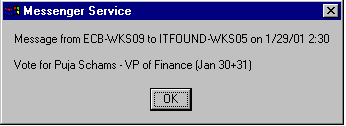
Message sent by Puja Schams
Message sent by Puja Schams
Also, this feature only works for computers running Windows NT or Windows 2000 (computer lab machines). It will not work on Windows 98 or 95 in the same way. I will include a section on how to do this in Win98/95 later on.
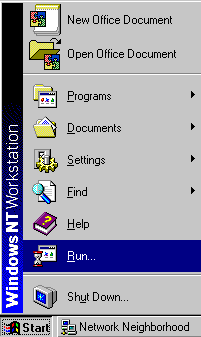
To access the program go to "Start" and to "Run" as shown below in Figure A. You can also bring the "run" window up by pressing the "Windows Key" and R together at the same time. The "Windows Key" is between the "CRTL" and "ALT" on either side of the spacebar on most computers.
 |
 |
|
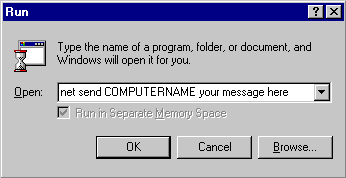
| Figure A - "Start" --> "Run" | Figure B - The "net send" command |
Next type in the following command: "net send COMPUTERNAME message" (as shown in figure B). Where "COMPUTERNAME" is replaced with the name of the computer you want to send a "message" to and message is replaced with what you want to say.
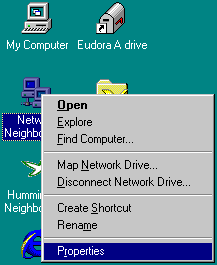
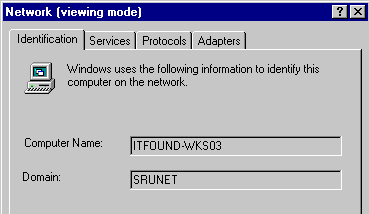
You can either send the message to the person's login ID (intials and last 4 digits of their SSN) or to their actual computer name. BUT if you send it to their login ID and they are logged on in two places (such as their dorm room and the lab) they might not get the message. Instead you want to send the message to the computer they are at. You can find out your computer name by right-clicking on the "network neighborhood" icon on the desktop and going to properties (as shown in Figure C).
 |
 |
|
| Figure C - Network properties | Figure D - Computer Name |
Once you have the computer name you can give it to someone else to send you a message. If you are in a lab, most likely the computers will be consecutively numbered so you can count how many computers away from you your friend is. For example, if your computer name was ITLAB-WKS07 and you sat three seats to the right of the person you want to send a message to then their computer name would be ITLAB-WKS04.